jb-map
Copyright (C) 2019-2021 Jeffrey Bostoen

 🍻 ☕
🍻 ☕
Need assistance with iTop or one of its extensions?
Need custom development?
Please get in touch to discuss the terms: info@jeffreybostoen.be / https://jeffreybostoen.be
Pro extension
This extension was complex to develop and is now very feature rich, so this became a professional extension.
What?
Adds a Map tab to iTop objects (‘detail view’). In this tab, it shows a map with the feature geometry (Point, LineString, Polygon).
There’s also a dashlet to show all objects of a class on a map. Here, it also offers a search/filter bar.
Map tab features
- Adding, modifying or clearing the feature from the object details is very straight forward.
- Last used basemap is remembered per user and per class (cookie)
Dashlet features
- search form with a look similar to iTop’s native search for objects
- a feature can be clicked upon to see its details in a popup. Customizable which attributes (text-based only) are shown.
- if a feature is clicked on while holding the [Alt]-key, iTop immediately redirects to the object details page
- if enabled, clicking on an empty spot on the map will result in redirection to a new object creation page with geometry (Point) prefilled.
- if enabled, objects are clustered on zooming out. Hovering over the cluster gives a sneak peak of the clustered features.
- last used basemap is remember per user and per dashlet (cookie)
Configuration options
- default zoom level
- default map center
- limit which types of features are allowed (Point, LineString, Polygon)
- source CRS (coordinate reference system)
- target CRS (coordinate reference system)
- add background maps (such as OpenStreetMap, Stamen, WMS, custom images, …)
- set default map
- …
Custom PHP Interfaces
- With these interface, additional controls can be added to the toolbar above the map or within the actual map (HTML) object.
Requirements
- iTop 2.7 (might work with 2.6, untested so far)
- PHP 7.2 or newer
Screenshots
Details view
- There’s a map tab when viewing the object details.
- When modifying, there’s an option to clear the geometry and pick a geometry type (Point, LineString, Polygon); predefined in the datamodel.
- Extensions are possible (but not included), such as an address lookup bar.
- Maps can be rotated (ALT + Shift + drag) or put into fullscreen (small button top right).

Dashlet
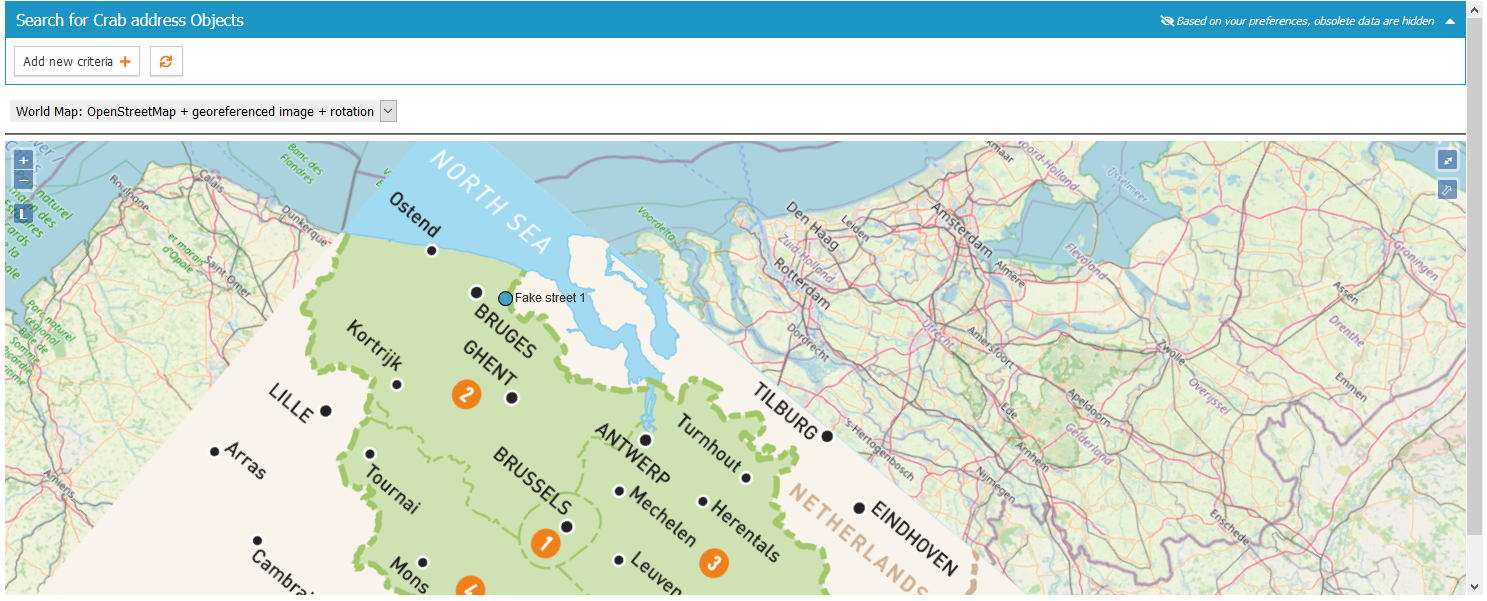
- Includes a dashlet with a search/filter bar, similar to iTop’s native lists.
- There’s also a cluster feature.
- Clicking the map on an empty spot will show the object creation dialog with the (point) geometry prefilled.
- Clicking a feature shows (limited) details (only ‘alphanumerical’ attributes are supported at this moment, not pictures/data).
- This dashlet uses a map with a georeferenced image.
Documentation
- See Documentation
Limitations
- Currently 1 feature per object.
- It has to be a SinglePoint, SingleLineString or SinglePolygon.
- MultiPoint, MultiLineString, MultiPolygon or other geometry types are unsupported.
- Complex features with lots of points may be too large to store. (unlikely)
- Currently stored the same way as an AttributeText (so not a MySQL geometry field). This is done to limit future compatibility issues with iTop.
- Background layers (such as OpenStreetMap) require an active internet connection. However, it is possible to run a GIS server offline.
- Bulk modification: there’s no map, just a field with a textual presentation of the coordinates.
- Images should be georeferenced in advance.
Good to know
Using QGIS Desktop (open source and free):
- the data can be quickly visualized (not edited!) and geospatial analysis can be performed.
- images (such as floor plans etc.) can be georeferenced (put onto a real world map at the right spot)
Translations
- French translation by Guillaume Lajarige (@Molkobain)
Cookbook
XML:
- how to add a new attribute type ‘AttributeGeometry’ to some classes (Location)
PHP:
- how to add an extra tab to the details view
- how to add menus
- how to get current module settings
- how to obtain a list of all iTop attribute names to check if an attribute is present (‘geom’)
- how to get the label (translation) of attributes
- how to add a CSS style, a CSS stylesheet, additional JavaScript libraries, JavaScript and HTML code
- how to create a custom dashlet
- how to hide a field
- how to create a custom attribute type
- …
iTop internals
- how to redirect to iTop new object creation page AND prefill information
Libraries
- OpenLayers 6.5.0
- Proj4JS 2.6.3